
SaaS is a different game.
Selling a one-time digital product is relatively simple:
- one checkout
- one payment
- one delivery flow
But SaaS revenue lives and dies by subscription infrastructure:
- free trials
- recurring billing
- upgrades/downgrades
- proration
- usage limits
- failed payments
- churn control
- reporting and LTV tracking
That’s why “just using Stripe” often isn’t enough once you scale.
You need more than a payment processor. You need a revenue system—a platform that doesn’t only charge customers, but helps you keep them paying, manage plan changes cleanly, and reduce churn automatically.
That’s where PayKickstart 2.0 positions itself as a serious option.
In this PayKickstart 2.0 for SaaS guide, you’ll learn:
- What PayKickstart 2.0 offers SaaS founders
- How trials work (free vs paid)
- upgrade/downgrade logic + proration explained
- usage-based billing support (and where it matters)
- Dunning and failed payment recovery
- affiliate partner scaling via Wallet
- Whether PayKickstart 2.0 is SaaS-ready in 2026
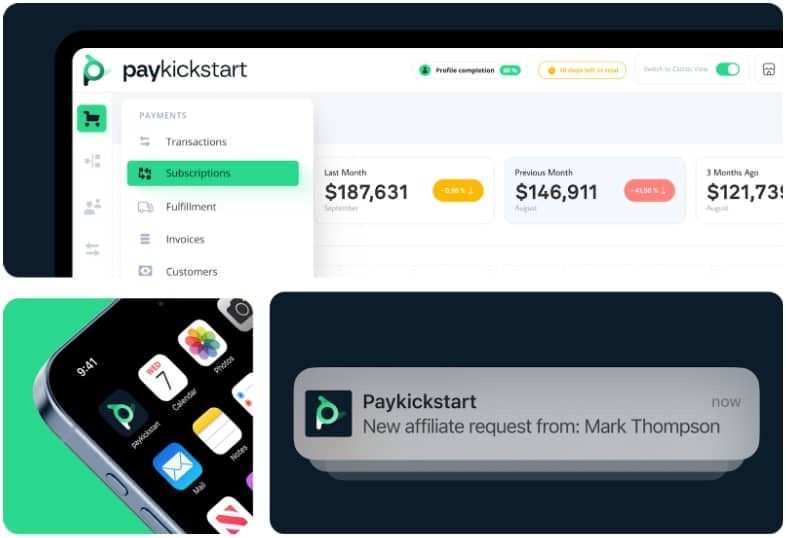
PayKickstart 2.0 for SaaS: Quick Summary
Best For: SaaS founders, subscription software companies, recurring service platforms
Core Strength: Subscription billing + retention automation + affiliate scaling tools
Key SaaS Features:
- trials (free/paid)
- subscription lifecycle management
- upgrades/downgrades
- proration logic
- dunning system (failed payment recovery)
- affiliate management + automated payouts (Wallet)
- integrations + API flexibility
If you want the overall platform breakdown first, read:
➡️ PayKickstart 2.0 Review (2026): The All-In-One Checkout + Subscription + Affiliate Revenue Engine
Why SaaS Billing Gets Complicated Fast (Even with “Simple” Pricing)
Most SaaS founders start with a clean plan structure:
- Basic: $29/month
- Pro: $79/month
- Business: $199/month
Then real customers show up.
And real customers demand real flexibility:
- “Can I try it free for 7 days?”
- “Can I pay annually?”
- “Can I upgrade mid-month?”
- “I hit my usage cap—how do I add more?”
- “My card failed, why did I lose access?”
- “Can my team have 3 seats?”
That’s when billing becomes a product itself.
Billing isn’t just finance—it’s customer experience, retention, and growth operations.
PayKickstart 2.0 aims to support these real-world SaaS needs without forcing you into endless workarounds.
Key SaaS Billing Features in PayKickstart 2.0
1) Trials (Free vs Paid) — What Works Best for SaaS?
Trials are one of the highest-impact levers in SaaS.
But trials can either:
✅ increase conversions
or
❌ attract low-quality users who churn quickly
PayKickstart 2.0 supports trial-based billing models, so you can structure your acquisition strategy more intelligently.
Free trials (best for strong activation funnels)
Free trials work when you have:
- onboarding flow
- in-app activation moments
- email onboarding sequences
- product-led growth experience
The goal: get users to experience value fast.
Paid trials (best for higher-intent markets)
Paid trials work well when:
- Your SaaS is premium
- You target business buyers
- Your onboarding includes high-value setup
- You want to filter out freebie-seekers
Smart SaaS strategy tip:
Paid trials can reduce churn because users who pay even a small amount are more likely to activate and stay.
2) Subscription Lifecycle Management (The SaaS Backbone)
For SaaS, billing is not “set and forget.”
You need to manage the full lifecycle:
- new subscription
- renewal cycles
- plan changes
- payment failures
- cancellations and retention attempts
- reactivations
PayKickstart 2.0 is structured around subscription lifecycle management, which makes it far more relevant for SaaS than basic carts that only process monthly charges.
3) Upgrades & Downgrades (Without Breaking Your Customer Experience)
This is where SaaS billing breaks for many businesses.
Customers change plans constantly:
- upgrade to access premium features
- downgrade to reduce cost
- switch from monthly to annual
- add users, remove users
If your system can’t handle plan changes cleanly, you end up with:
- manual support tickets
- billing confusion
- canceled accounts
- refunds
- angry users
PayKickstart 2.0 supports upgrade/downgrade logic so you can manage plan movement more smoothly.
4) Proration (Explained Without Technical Jargon)
Proration is one of those features you don’t care about… until you need it.
What proration means
If a customer upgrades mid-cycle, proration ensures they:
- pay only the difference
- don’t get double-charged
- don’t feel cheated
- receive access immediately
Example:
- User pays $29/month
- Upgrades to $79/month halfway through month
- Proration bills the difference fairly
This prevents friction during upgrades—which is critical, because upgrades are where SaaS profits compound.
When proration works smoothly, customers upgrade without thinking.
When it doesn’t, customers hesitate and churn.
PayKickstart 2.0 is built to handle this type of billing logic more effectively than basic carts.
5) Usage-Based Billing (When You Actually Need It)
Not every SaaS needs usage-based billing.
But if you run:
- AI tools (tokens/credits)
- social automation tools (volume limits)
- API-based SaaS (requests/units)
- video processing platforms (minutes/exports)
- storage-based products
…usage billing becomes extremely important.
PayKickstart 2.0 includes enhanced billing logic in version 2.0, positioned to support:
- flexible billing rules
- usage-based pricing frameworks
- credit systems and overages
This matters because modern SaaS is moving beyond simple “one flat monthly price.”
In 2026, users expect:
- flexible pricing
- scalable plans
- pay-as-you-grow usage models
Retention: The Most Important SaaS Metric PayKickstart Supports
SaaS isn’t won by getting more customers.
It’s won by keeping customers.
That’s why retention systems matter more than flashy checkout templates.
6) PayKickstart 2.0 Dunning (Failed Payment Recovery for SaaS)
One of the most dangerous SaaS churn types is involuntary churn:
- card expired
- bank blocked payment
- billing failed silently
- customer didn’t notice
This is churn that should never happen.
PayKickstart 2.0 includes an automated dunning system designed to:
- retry failed charges
- remind customers to update billing
- keep subscriptions active during the recovery window
- reduce involuntary churn automatically
This protects your baseline MRR without your team chasing customers manually.
➡️ Read the full breakdown:
PayKickstart 2.0 Dunning System: Recover Failed Payments & Reduce Churn
7) Subscription Reporting & Metrics (MRR Clarity)
To scale SaaS, you must know:
- what’s driving churn
- which plans convert best
- what your LTV looks like
- where revenue is leaking
- which partners generate quality customers
PayKickstart 2.0 includes reporting tools across:
- revenue performance
- subscription trends
- affiliate performance
- sales activity
This helps you move from guessing to optimizing.
PayKickstart 2.0 for SaaS Growth: Affiliate & Partner Scaling
SaaS growth isn’t just ads and SEO anymore.
In 2026, many SaaS companies scale through:
- affiliates
- agencies
- influencers
- referral partners
- JV-style partnerships
But paying partners becomes difficult at scale—especially with recurring subscriptions.
That’s why PayKickstart 2.0 includes a unique advantage:
✅ PayKickstart Wallet
8) PayKickstart Wallet (Automated Partner Payouts)
PayKickstart Wallet is designed to automate affiliate payouts while protecting vendors from refund abuse.
Key SaaS benefits:
- structured commission tracking
- automated payouts
- payout holds to cover refund risk
- Trust Score system that rewards reliable partners
This is important because top partners will not promote your SaaS if payouts are messy or delayed.
Wallet creates a smoother partner ecosystem, which can directly increase SaaS growth speed.
➡️ Read the full Wallet review:
PayKickstart Wallet Review (2026): Automated Affiliate Payouts + Trust Score
Integration & API Flexibility (SaaS Needs This)
SaaS businesses rarely operate with a “basic stack.”
You typically need integrations with:
- CRMs
- email automation
- onboarding sequences
- membership/access control tools
- analytics platforms
- customer support systems
- webhooks and automation triggers
PayKickstart 2.0 supports:
- native integrations
- Zapier connections
- automation triggers
- API support for custom workflows
This is critical if you want billing to connect cleanly with product access and user lifecycle steps.
Who Should Use PayKickstart 2.0 for SaaS?
PayKickstart 2.0 makes the most sense if your SaaS has:
✅ recurring subscription revenue as core model
✅ multiple plans (and plan changes)
✅ trials or onboarding-driven conversion
✅ desire to reduce failed payment churn
✅ partner/affiliate growth strategy
✅ need for billing + retention systems in one platform
Who Should NOT Use PayKickstart 2.0 for SaaS?
PayKickstart 2.0 might not be the best choice if:
- your SaaS pricing is ultra-simple and you never plan to change it
- you don’t use affiliates or partner marketing
- you want the lightest possible billing setup with minimal configuration
- you only need a basic monthly payment flow
However, many SaaS companies start simple… and quickly become complex.
So the real question is:
Do you want a platform that supports where you are now—or where you’re going?
Pros and Cons: PayKickstart 2.0 for SaaS (Honest Review)
Pros
- strong trial support
- clean subscription lifecycle management
- upgrade/downgrade + proration readiness
- built-in dunning (failed payment recovery)
- partner scaling via Wallet payout automation
- reporting + analytics infrastructure
- integrations and API flexibility
Cons
- learning curve for beginners
- can feel “too powerful” if you only need basic billing
- best results require smart configuration
FAQs: PayKickstart 2.0 for SaaS
Can PayKickstart 2.0 replace Stripe for SaaS billing?
PayKickstart doesn’t replace payment processing entirely—it works as a management layer. It can help SaaS businesses handle subscription logic, retention automation, and partner payouts more effectively than basic processing tools alone.
Does PayKickstart 2.0 support free trials?
Yes. It supports trial models and recurring subscription setups.
Does PayKickstart support upgrades and downgrades?
Yes, PayKickstart 2.0 is designed with flexible billing models including plan changes and subscription management.
Is PayKickstart good for usage-based SaaS?
PayKickstart 2.0 includes improved billing logic designed to support modern pricing structures. Whether it fits your exact usage billing model depends on your implementation needs.
Can I run affiliates for my SaaS with PayKickstart?
Yes. PayKickstart includes affiliate management plus PayKickstart Wallet for payout automation.
Final Verdict: Is PayKickstart 2.0 SaaS-Ready in 2026?
Yes—PayKickstart 2.0 is a serious SaaS-ready platform if your goal is scale.
It’s built for recurring revenue operations, not just checkouts.
It supports the key billing challenges SaaS founders face:
- trials
- upgrades/downgrades
- proration
- dunning (failed payment recovery)
- partner payouts
- retention-friendly subscription management
If you’re building SaaS for long-term revenue and you want a system that protects your MRR automatically, PayKickstart 2.0 is worth strong consideration.

